
Kubernetes Explained: The Control Plane Behind Modern Applications
Containers made applications portable. Kubernetes made them operable at scale.

Let MyClaw Do the Follow-Up (Sponsor)

One of the nicest things about AI is when you don’t have to remember to ask. MyClaw lets you run OpenClaw in the cloud, schedule recurring tasks, and receive updates in Telegram or WhatsApp automatically.
Whether you’re keeping up with AI news, tracking a project, or researching a topic over time, it’s a simple way to turn OpenClaw into something that keeps working after you’ve logged off.
Containers solved a huge software delivery problem.
Before containers, teams had to worry about whether an application would behave the same way across a developer’s laptop, a staging server, and production. Docker changed that by letting teams package an application with its dependencies, runtime, libraries, and configuration into a portable unit.
But containers created a second problem.
Running one container is easy. Running ten is manageable. Running hundreds or thousands across different services, servers, environments, and cloud regions is where things start to break down.
You now have to answer harder questions.
Where should each container run? What happens when one crashes? How do services find each other when container IPs keep changing? How do you roll out a new version without downtime? How do you scale during traffic spikes? How do you keep teams from stepping on each other’s workloads?
This is the problem Kubernetes was built to solve.
Kubernetes, often called K8s, is an open-source container orchestration platform that automates the deployment, scaling, networking, and management of containerized applications. Instead of manually managing every container, engineers describe the desired state of an application, and Kubernetes continuously works to make the real system match that state.
That is the big mental model.
Kubernetes is a place to run containers likewise a control system for applications.
The Core Idea
The simplest way to understand Kubernetes is this:
You tell Kubernetes what you want the application to look like, and Kubernetes figures out how to keep it that way.
For example, you might say: “Run three replicas of this web service, expose it internally, give it this configuration, and restart it if it fails.”
Kubernetes stores that desired state. Then it continuously watches the actual state of the cluster. If one replica crashes, Kubernetes starts another. If a node fails, Kubernetes can move workloads elsewhere. If traffic increases, Kubernetes can help scale the application.
This is what makes Kubernetes different from manually starting containers.
A manual command runs once. Kubernetes keeps reconciling.
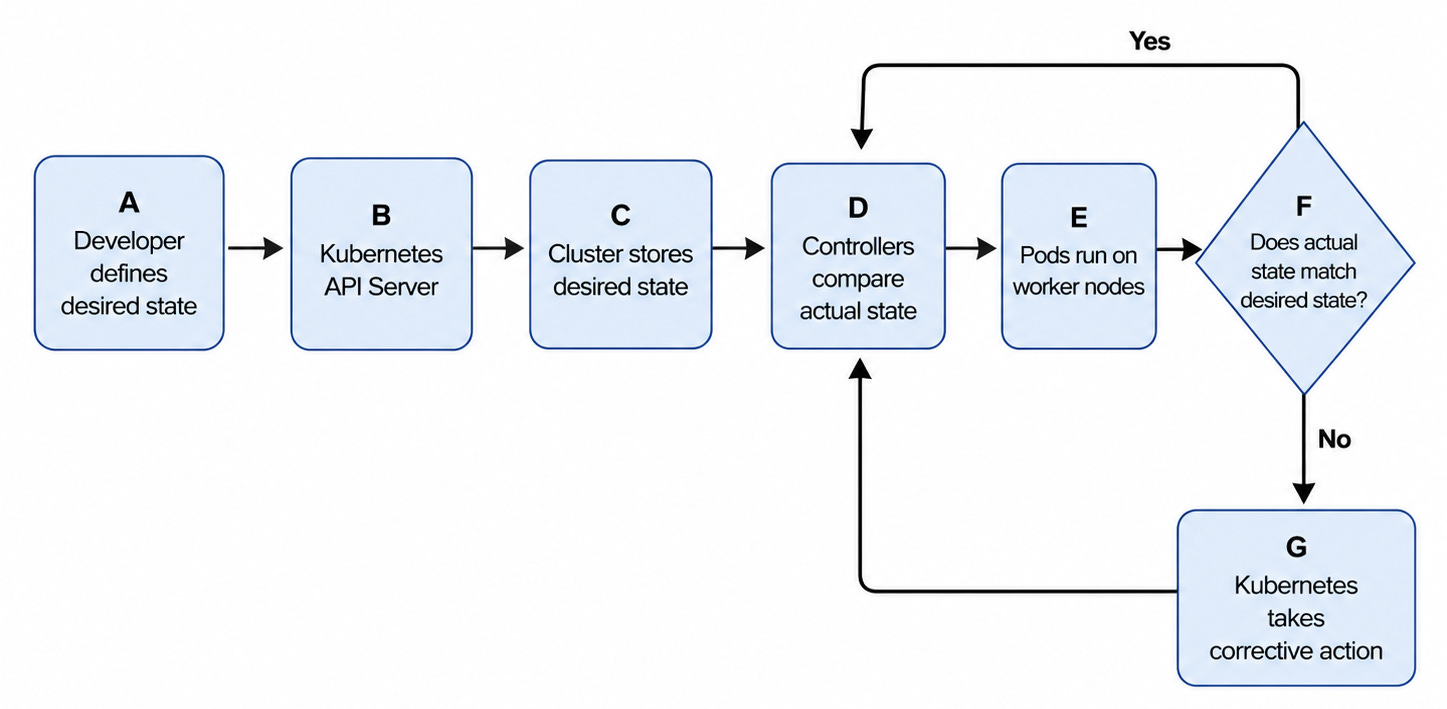
This reconciliation loop is why Kubernetes is powerful. It gives engineering teams a way to operate distributed systems without manually chasing every failed container, changing IP address, or scaling event.
Why Kubernetes Became Necessary
Containers are temporary by design. They can start, stop, crash, move, or be replaced. That is fine when you are testing locally, but it becomes a real operational challenge in production.
A modern application is rarely one service. It may include a frontend, several backend APIs, authentication, billing, search, background workers, queues, monitoring agents, and internal tools. Each service may need multiple replicas. Each replica may run on a different machine. Each one may have different resource needs.
Without orchestration, teams end up with container sprawl.
The problem is not just the number of containers. It is the fact that everything is constantly changing. Traffic changes. Nodes fail. Deployments happen. Containers restart. New versions roll out. Services need to communicate even when the underlying infrastructure is moving.
Kubernetes gives teams a standard way to manage that movement.
It handles placement, recovery, service discovery, scaling, and lifecycle management. Developers define the application. Kubernetes handles much of the operational work required to keep it running.
That is why Kubernetes became the default foundation for many cloud-native platforms.
How Developers See Kubernetes
From a developer’s perspective, Kubernetes usually starts with a YAML file.
The developer writes a manifest that describes the application. This file may include the container image, number of replicas, ports, environment variables, resource requirements, and configuration.
Then the developer applies it:
kubectl apply -f app.yamlAfter that, Kubernetes takes over.
It validates the request, stores the desired state, schedules the workload onto a node, starts the container, monitors its health, and keeps checking whether the running system still matches what the developer requested.
The developer does not need to manually SSH into servers, choose where the container should run, or restart it after a crash.
The YAML becomes the contract. Kubernetes becomes the operator.
The Kubernetes Architecture
A Kubernetes cluster has two major parts: the control plane and the worker nodes.
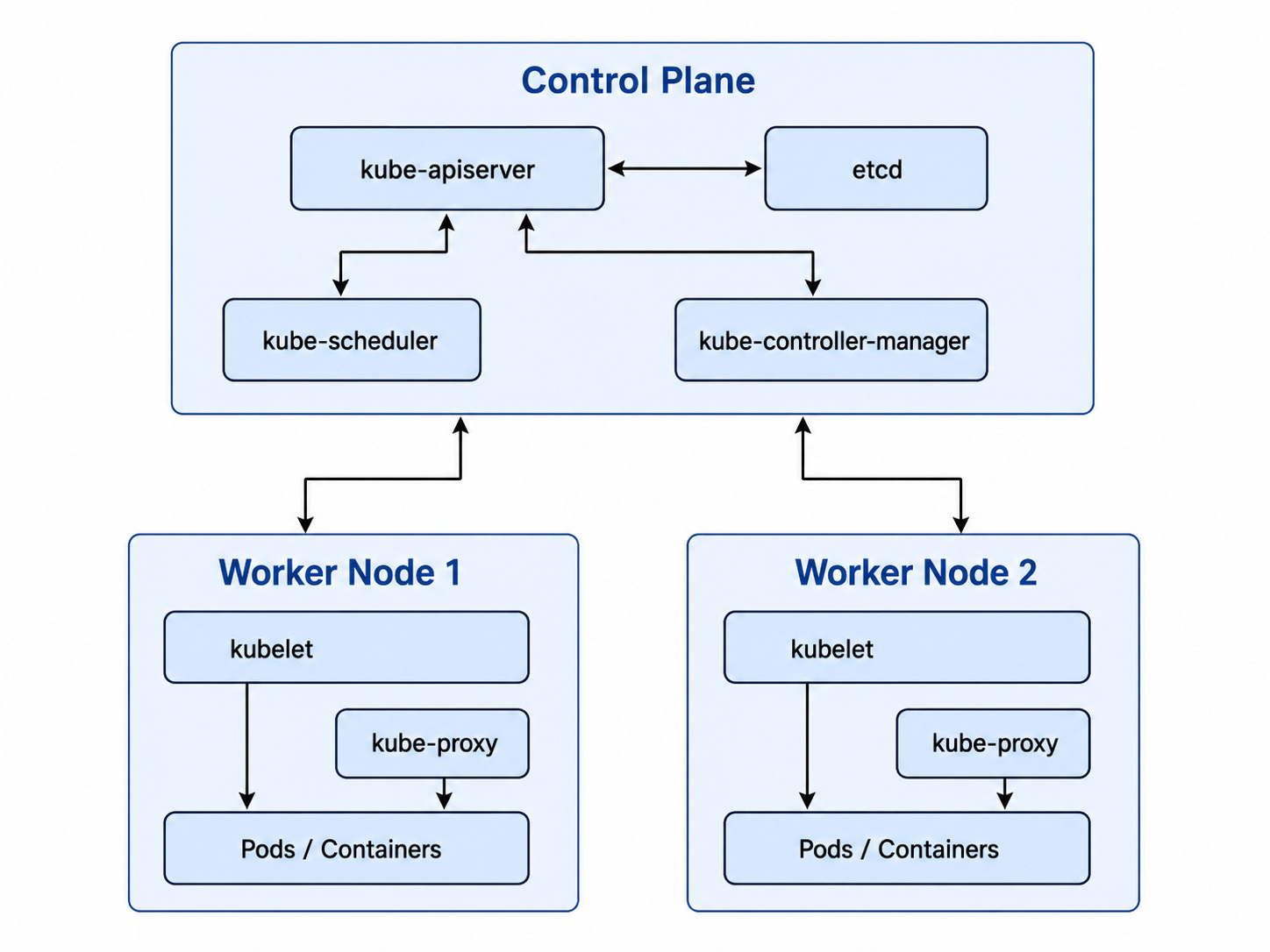
The control plane is the brain of the cluster. It receives requests, stores state, makes scheduling decisions, and runs controllers that keep the system aligned with the desired state.
The worker nodes are where the application workloads actually run.
flowchart TB
    subgraph CP[Control Plane]
        API[kube-apiserver]
        ETCD[etcd]
        SCHED[kube-scheduler]
        CM[kube-controller-manager]
    end

    subgraph W1[Worker Node]
        K1[kubelet]
        P1[kube-proxy]
        POD1[Pods / Containers]
    end

    subgraph W2[Worker Node]
        K2[kubelet]
        P2[kube-proxy]
        POD2[Pods / Containers]
    end

    API <--> ETCD
    API --> SCHED
    API --> CM
    API <--> K1
    API <--> K2
    K1 --> POD1
    K2 --> POD2
    P1 --> POD1
    P2 --> POD2
The API Server is the front door. Every request goes through it, whether it comes from kubectl, a controller, or another system.
etcd is the memory of the cluster. It stores the desired and current state of Kubernetes objects.
The Scheduler decides where Pods should run. It looks at available nodes, CPU, memory, constraints, and scheduling rules before assigning a Pod to a node.
The Controller Manager runs control loops. These controllers constantly check whether reality matches the desired state. If something is missing, unhealthy, or out of sync, controllers try to fix it.
On each worker node, the kubelet is responsible for making sure the assigned Pods are running. kube-proxy handles networking rules so traffic can reach the right Pods.
Together, these components turn a group of machines into a programmable application platform.
What Happens When You Deploy an App?
Let’s trace a simple deployment.
A developer runs:
kubectl apply -f my-app.yamlThe request goes to the API Server. The API Server validates the manifest and stores the desired state in etcd.
The Scheduler notices that a new Pod needs to run. It looks for a suitable worker node and assigns the Pod there.
The kubelet on that node receives the instruction, pulls the container image, and starts the container.
Once the Pod is running, the kubelet reports the status back to the API Server. Kubernetes updates the current state.
If the Pod crashes later, the controllers notice that the actual state no longer matches the desired state. Kubernetes then creates or restarts a Pod to bring the system back into alignment.
This is why Kubernetes is not just a deployment tool. It does not simply start containers but manages the lifecycle of those containers after they are running.
Pods: The Smallest Unit
A Pod is the smallest deployable unit in Kubernetes.
Most of the time, a Pod contains one application container. In some cases, it may contain multiple tightly coupled containers that need to share networking, storage, or lifecycle behavior.
For example, an application container may run alongside a logging sidecar or a service mesh proxy. These containers share the same Pod environment.
A simple Pod looks like this:
apiVersion: v1
kind: Pod
metadata:
  name: nginx-pod
  labels:
    app: webserver
spec:
  containers:
    - name: nginx-container
      image: nginx:latest
      ports:
        - containerPort: 80
This creates a Pod running an NGINX container.
But in production, teams rarely manage standalone Pods directly. Pods are temporary. They can be deleted, replaced, or rescheduled. If you want reliability, scaling, and safe updates, you usually use a Deployment.
Deployments: Keeping Pods Alive
A Deployment manages Pods for you.
Instead of creating one Pod manually, you define how many replicas of an application should run. Kubernetes then creates and maintains those replicas.
For example:
apiVersion: apps/v1
kind: Deployment
metadata:
  name: nginx-deployment
spec:
  replicas: 3
  selector:
    matchLabels:
      app: nginx
  template:
    metadata:
      labels:
        app: nginx
    spec:
      containers:
        - name: nginx-container
          image: nginx:latest
          ports:
            - containerPort: 80
This tells Kubernetes to keep three NGINX Pods running.
If one Pod crashes, Kubernetes creates a replacement. If a node fails, Kubernetes can move the workload elsewhere. If you update the container image, Kubernetes can roll out the new version gradually.
This is the reason Deployments are one of the most common Kubernetes objects. They turn fragile individual Pods into a managed application workload.
Services: Stable Networking for Unstable Pods
Pods are ephemeral, which means their IP addresses are not reliable. If a Pod is replaced, it gets a new IP address.
That creates a problem. How does one service call another service if the target keeps changing?
Kubernetes solves this with Services.
A Service gives a stable endpoint to a group of Pods. Clients talk to the Service, and the Service routes traffic to the right Pods behind it.
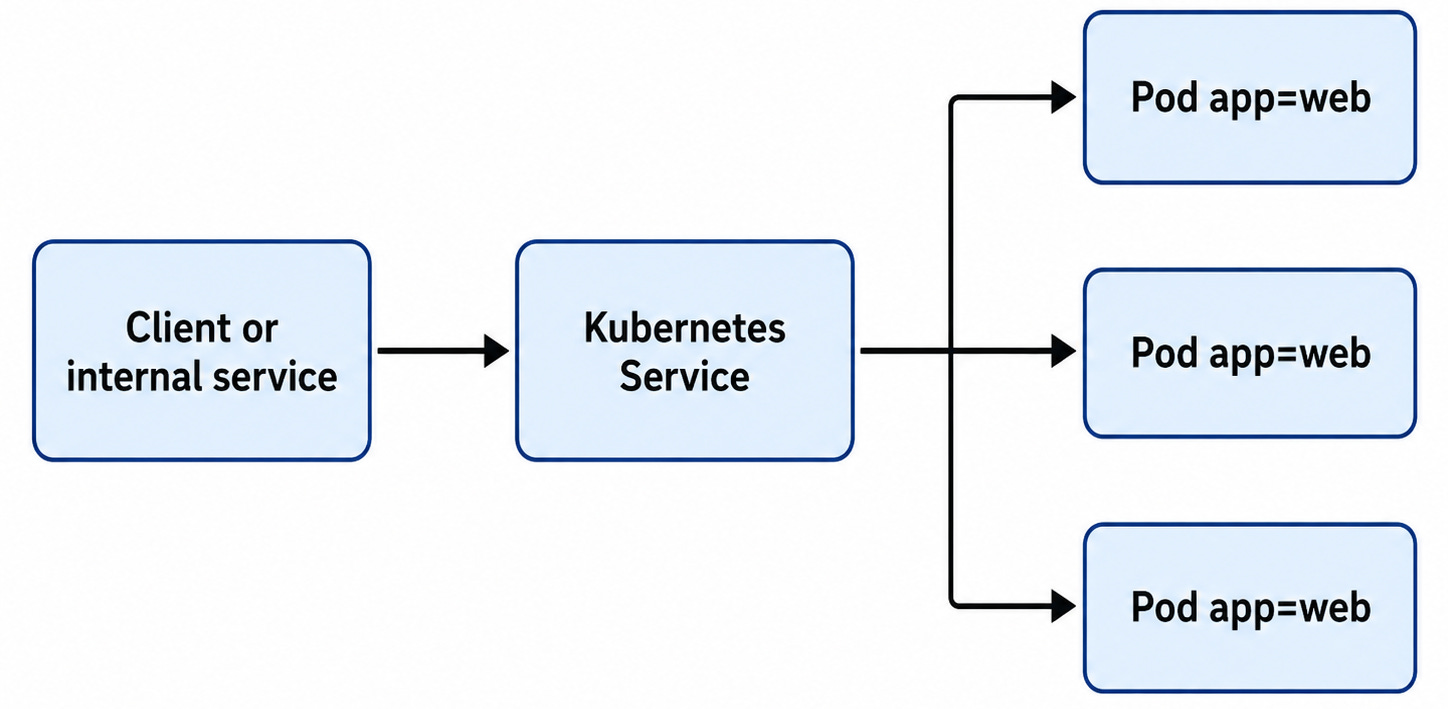
This makes service-to-service communication much more reliable.
A ClusterIP Service exposes an application inside the cluster. A NodePort Service exposes it through a port on each node. A LoadBalancer Service exposes it externally through a cloud provider’s load balancer.
In real production environments, most internal services use ClusterIP. Public-facing services usually sit behind LoadBalancers, ingress controllers, or API gateways.
ConfigMaps and Secrets
Applications need configuration.
The same container image may run in development, staging, and production, but the configuration will be different. The environment name, log level, feature flags, database host, and external API endpoints may all change.
Kubernetes uses ConfigMaps for non-sensitive configuration.
apiVersion: v1
kind: ConfigMap
metadata:
  name: app-config
data:
  APP_NAME: "MyK8sApp"
  APP_ENV: "production"
For sensitive values such as passwords, tokens, and API keys, Kubernetes provides Secrets.
apiVersion: v1
kind: Secret
metadata:
  name: app-secret
type: Opaque
data:
  DB_PASSWORD: bXlzdXBlcnNlY3JldA==
One important reminder: base64 encoding is not encryption. Kubernetes Secrets should still be handled carefully. In production, teams should avoid committing raw secrets into Git and should consider sealed secrets, external secret managers, or cloud-native secret systems.
This is one of the places where Kubernetes moves from “developer convenience” to “platform governance.” Configuration needs to be easy to use, but secrets need to be controlled.
Persistent Storage
Not every application is stateless.
A stateless service can be replaced without losing important local data. Many web services and APIs work this way.
Stateful applications are different. Databases, message queues, storage systems, and some analytics workloads need their data to survive Pod restarts and rescheduling.
Kubernetes handles this through Persistent Volumes and Persistent Volume Claims.
A Persistent Volume represents actual storage in the cluster. A Persistent Volume Claim is a request for storage from an application.

The application does not need to know the exact storage backend. It asks for storage through a claim, and Kubernetes binds that claim to a volume.
This abstraction is useful, but stateful workloads still require careful planning. Running databases on Kubernetes means thinking deeply about backups, replication, failover, performance, storage classes, and disaster recovery.
Kubernetes can manage stateful workloads, but it does not remove the hard parts of state.
Scaling: Pods First, Nodes Second
Kubernetes can scale at two levels.
First, it can scale the number of Pods. This is usually done with the Horizontal Pod Autoscaler, or HPA. HPA watches metrics such as CPU, memory, or custom application metrics and adjusts the number of replicas.
For example, if traffic increases and CPU usage rises, HPA can add more Pods. When traffic drops, it can reduce the number of Pods.
apiVersion: autoscaling/v2
kind: HorizontalPodAutoscaler
metadata:
  name: nginx-hpa
spec:
  scaleTargetRef:
    apiVersion: apps/v1
    kind: Deployment
    name: nginx-deployment
  minReplicas: 2
  maxReplicas: 5
  metrics:
    - type: Resource
      resource:
        name: cpu
        target:
          type: Utilization
          averageUtilization: 50
Second, Kubernetes can scale the cluster itself. If there are not enough nodes to run new Pods, the Cluster Autoscaler can add nodes. If nodes are underused, it can remove them.
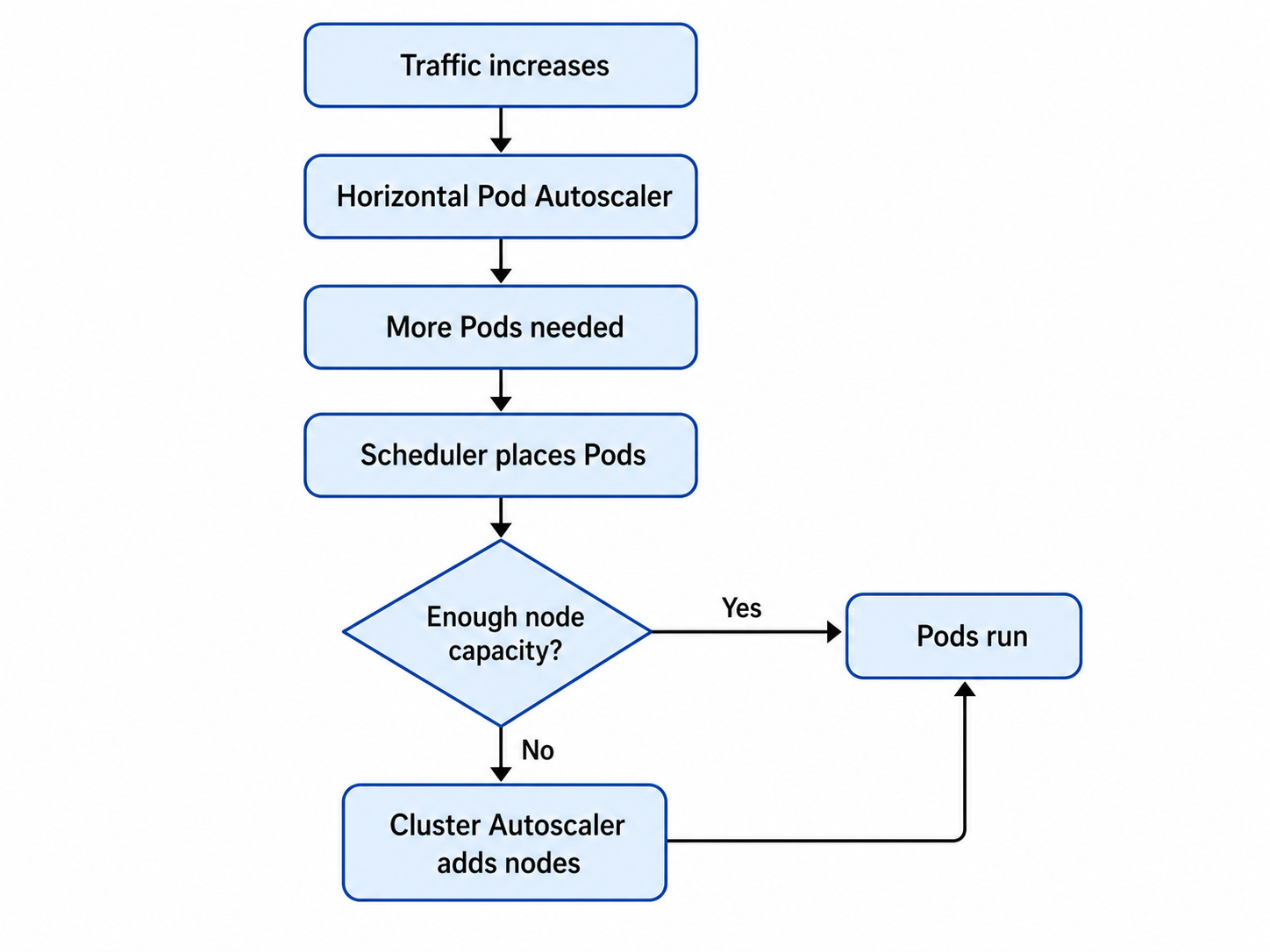
This scaling model is powerful, but it depends on accurate resource requests. If teams do not define CPU and memory requests, Kubernetes has less information for scheduling and autoscaling decisions.
Autoscaling is not magic. It is only as good as the signals and constraints you give it.
The Production Detail Teams Miss: Resources
In Kubernetes, every workload should define resource requests and limits.
A request tells Kubernetes how much CPU or memory a container needs. A limit tells Kubernetes the maximum amount the container can use.
resources:
  requests:
    cpu: "250m"
    memory: "256Mi"
  limits:
    cpu: "500m"
    memory: "512Mi"
This sounds like a small detail, but it has a huge impact.
Without resource requests, Kubernetes may schedule too many workloads onto the same node. That can create noisy-neighbor problems and unpredictable performance. Without memory limits, one container can consume too much memory and affect other workloads.
But limits also need care. If CPU limits are too strict, applications can experience throttling. For latency-sensitive systems, that can become a production issue.
For platform engineers and SREs, resource management is not just optimization. It is reliability engineering.
Where Kubernetes Gets Risky
Kubernetes gives teams a powerful platform, but it also expands the attack surface.
The API Server, service accounts, RBAC, Secrets, container images, network policies, admission controls, and runtime behavior all become part of the security model.
A common failure mode is giving workloads too much permission. If a service account can read Secrets across a namespace, a compromised Pod may expose credentials for other applications.
Another risk is exposing too many Services externally. Not every service needs a public endpoint. Most internal services should stay internal.
Secrets are another recurring issue. Kubernetes makes it easy to inject secrets into workloads, but teams still need a secure way to store, rotate, and audit them.
The lesson is simple: Kubernetes should come with guardrails.
Namespaces, RBAC, network policies, secure image pipelines, external secret management, and observability should not be afterthoughts. They should be part of the platform design.
Why This Matters for Platform Teams
For platform engineers, Kubernetes is the foundation for internal developer platforms.
It creates a standard way to deploy applications, expose services, manage configuration, enforce policies, and scale workloads. But raw Kubernetes can be too complex for every developer to use directly.
That is why many mature teams build abstractions on top of it.
Developers may deploy through GitOps workflows, internal portals, golden templates, or service catalogs. Behind the scenes, those systems generate Kubernetes resources. The developer gets a simpler experience, while the platform team keeps control over reliability, security, and consistency.
For SREs, Kubernetes becomes a common language for reliability. It gives teams a way to think about desired state, health, rollouts, capacity, ownership, and failure recovery.
But Kubernetes does not replace operational discipline. It amplifies it.
A well-designed Kubernetes platform can make teams faster and more reliable. A poorly managed one can become a new layer of complexity.
Final Takeaway
Containers made applications portable.
Kubernetes made containers manageable at scale.
The main idea is simple: developers define the desired state, and Kubernetes continuously works to maintain it. Under the hood, the control plane, worker nodes, Pods, Deployments, Services, ConfigMaps, Secrets, volumes, and autoscalers all work together to make that happen.
But Kubernetes is not magic infrastructure.
It needs good resource management, secure defaults, clear ownership, observability, and platform guardrails. Without those, teams can easily recreate the same operational chaos they were trying to escape.
The real value of Kubernetes is not that it makes distributed systems simple.
It gives engineering teams a structured way to manage complexity.